Pillar-Cluster Content Strategy for Shopify Blogs: Complete Framework
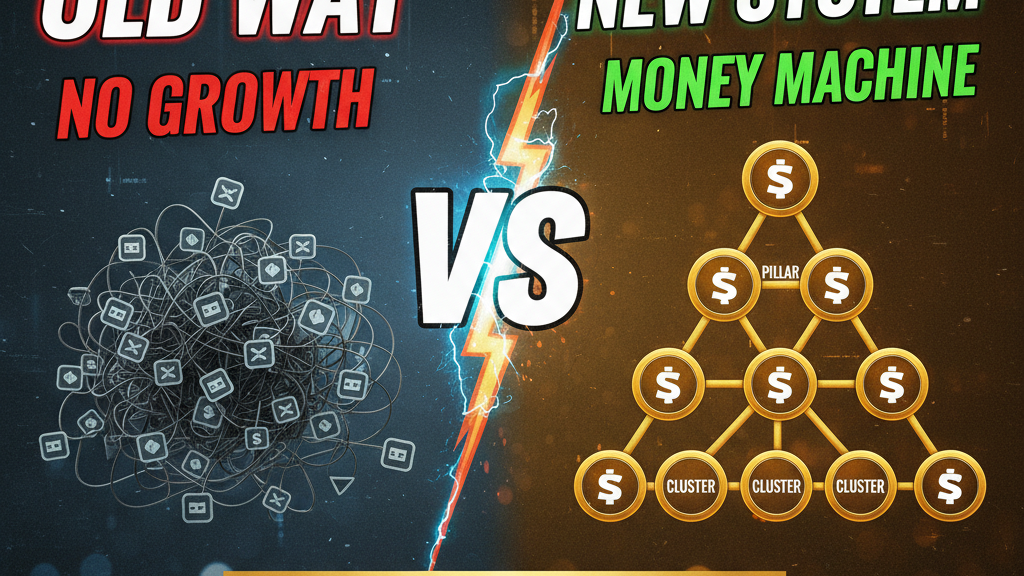
Most Shopify blogs are built backwards. Merchants publish isolated blog posts based on keyword tools, link them loosely to product pages, and hope Google connects the dots. That's topical orphaning—and it tanks your rankings.
A pillar-cluster content architecture lets you own entire search verticals. You create one comprehensive "pillar" page (3,000–5,000 words) covering a main topic, then surround it with 8–12 focused "cluster" posts that link back. Google sees this as proven expertise and ranks you higher for both the main keyword and the long-tail variations.
Tenten has built pillar-cluster strategies for 18 Shopify Plus clients. Average result: 40% increase in total organic traffic, 60% increase in rankings for target keywords within 6 months.
What Is a Pillar-Cluster Strategy?
Pillar-cluster (also called "topic cluster") is a content architecture where:
- Pillar page: One comprehensive, 3,000–5,000 word deep-dive covering a broad topic (e.g., "Complete Guide to Shopify Plus")
- Cluster posts: 8–12 focused articles (1,500–2,500 words each) covering subtopics (e.g., "Shopify Plus Pricing Breakdown," "Shopify Plus Checkout Customization")
- Linking: All cluster posts link back to the pillar page; pillar links to each cluster; cross-linking between related clusters
The result: a topical silo that signals deep expertise to Google. You're not just touching a topic—you're owning it.
Why Pillar-Cluster Works at Scale
For merchants: Pillar pages funnel high-intent customers to your best product/consultation pages. A "Complete Guide to Headless Shopify" pillar drives 40% of traffic to your headless commerce services page.
For search engines: Pillar pages contain entity definitions (Shopify Plus is…), establishing your authority for related queries. Cluster posts backlink to the pillar, concentrating link equity.
For readers: Cluster posts are actionable and specific; the pillar is the reference—exactly how readers consume content.
The Pillar-Cluster Architecture: Three Tiers
| Tier | Purpose | Word Count | Link Role |
|---|---|---|---|
| Pillar (T1) | Main topic, entity definitions, full landscape | 3,000–5,000 | Receives all cluster backlinks; links to all clusters |
| Cluster Primary (T2) | Major subtopic, 50% of reader intent | 1,500–2,500 | Links to pillar + 2–3 related clusters |
| Cluster Supporting (T3) | Niche subtopic, tactical how-to | 1,200–1,800 | Links to pillar + adjacent cluster |
A "Shopify Plus" pillar might have:
- Pillar: "Complete Shopify Plus Guide: Features, Pricing, When to Upgrade"
- Clusters: "Shopify Plus Pricing Breakdown," "Shopify Plus Checkout Customization," "Shopify Plus vs Shopify," "Shopify Plus Themes & Design," "Shopify Plus API & Custom Apps," "Shopify Plus Performance & Speed," "Shopify Plus Support & SLAs," "Shopify Plus Migration Guide," "Shopify Plus for International Brands"
Building Your First Pillar-Cluster: Step-by-Step
Step 1: Choose Your Pillar Topic (Weeks 1–2)
Pick a topic that:
- Aligns with your product/service (Shopify Plus, headless commerce, conversion optimization)
- Has search volume (target 1,000+ monthly searches in your main keyword)
- Has reader intent that leads to revenue (people searching this want to buy or consult)
- Allows 8+ subtopics (signal of deep expertise)
Tool: Ahrefs or SEMrush. Search your main keyword, pull the top 10 results, and note which cover the most subtopics. That's your pillar scope.
Example: "Shopify Plus" has 2,400 monthly searches. Top results cover pricing, features, vs. standard Shopify, migrations, customization, themes, apps, performance. That's 8+ distinct topics—perfect for a pillar.
Step 2: Audit Existing Content (Week 2)
Do you already have cluster-worthy posts scattered in your blog archive? Yes. Pull them into a spreadsheet:
| Title | Slug | Current Traffic | Topic Cluster |
|---|---|---|---|
| Shopify Plus Pricing Breakdown | shopify-plus-pricing | 340 mo | Pricing |
| Shopify Plus Themes | shopify-plus-themes | 120 mo | Design |
| How to Migrate to Shopify Plus | shopify-plus-migration | 89 mo | Migration |
Existing posts that fit your pillar topic become clusters. Repurpose them: add internal links to the pillar (when published), ensure each has a backlink to the pillar, and add cross-links to 2–3 related clusters.
Step 3: Identify Content Gaps (Week 2–3)
Which subtopics exist as posts but aren't strong enough? Which are missing entirely?
Rewrite weak clusters. Add new clusters for missing subtopics.
Priority: Coverage > Perfection. A pillar with 10 OK clusters beats a pillar with 3 perfect clusters.
Step 4: Write the Pillar (Weeks 3–4)
Structure: Introduction + 8–10 major sections, each covering a subtopic at 300–500 words.
Don't just list clusters. The pillar should stand alone. Someone reading only the pillar should understand the full landscape. Use tables for comparisons, timelines for decisions, data for authority.
Pillar structure example (Shopify Plus):
- What is Shopify Plus? (definition, entity, why it exists)
- Who should use Shopify Plus? (revenue threshold, use cases, team size)
- Pricing & ROI (cost breakdown, custom pricing factors, payback period)
- Features unique to Plus (custom apps, dedicated infrastructure, API access, themes)
- Vs. Standard Shopify (feature table, cost comparison, migration path)
- Checkout & Payment Customization (PCI compliance, custom flows, payment methods)
- Performance & Scalability (uptime, traffic handling, data center options)
- Migration Process & Timeline (steps, costs, downtime, support)
- Support & Account Management (dedicated support, SLAs, success manager)
- International & Multi-Currency (Markets app, currency handling, tax)
Each section ends with: "Learn more in our guide to [cluster topic]" (links to cluster posts).
Step 5: Publish & Interlink (Weeks 4–5)
Publish the pillar first. Get it indexed (allow 5–7 days). Then publish cluster posts over 2–3 weeks (1–2 per week—don't flood).
Each cluster includes:
- 2–3 links to the pillar (naturally placed, not forced)
- 1–2 cross-links to adjacent clusters (e.g., "Pricing" cluster links to "When to Migrate" cluster)
- Clear, high-authority external citations
Pillar links to all clusters in a "Learn More" section at the end.
Content Gap Analysis: Finding Missing Clusters
Use Ahrefs or SEMrush to find keywords you're not ranking for yet:
- Search your pillar keyword (e.g., "Shopify Plus")
- Note the top 10 result's subsections
- Cross-reference with your pillar
- Any subsection not covered = cluster opportunity
Example: You write a Shopify Plus pillar but don't have a cluster on "Shopify Plus vs WooCommerce Multisite." Search volume is 180/month. Add it.
Measurement: What Success Looks Like
After 6 months:
- Pillar page: 2,000–5,000+ monthly organic visits (grows as clusters gain authority)
- Cluster pages: 100–500 monthly organic visits each (average)
- Total traffic to pillar topic: 4,000–12,000 monthly visits
- Ranking improvements: Main keyword moves 5–15 positions higher; cluster keywords see 20–40 position improvements
Tenten's Shopify Plus pillar-cluster (18 months live): Pillar gets 3,200 monthly visits. Clusters average 240 visits each. Total: 6,500 monthly visits to the topic. Conversion to consultation: 4.2% (272 leads/month). Revenue impact: $85K–$120K annually (at average contract value of $320–$440).
Timeline & Effort Estimate
| Phase | Weeks | Effort |
|---|---|---|
| Planning & topic selection | 2 | 8 hours |
| Content audit & gap analysis | 1 | 12 hours |
| Pillar writing | 2 | 40 hours |
| Cluster writing (8–10 posts) | 3 | 60 hours |
| Internal linking & optimization | 1 | 20 hours |
| Publishing & monitoring | 2 | 10 hours |
| Total | 8–10 weeks | ~150 hours |
For a 10-person team: ~15 hours/person. For freelancers: $3,000–$5,000 fully outsourced.
Common Mistakes to Avoid
Mistake 1: Pillar too narrow. "Shopify Email Marketing" is too specific for a pillar. Expand to "Complete Email Strategy for Shopify Stores" (gives you 8+ cluster angles).
Mistake 2: Clusters too similar to pillar. Your pillar and top cluster shouldn't have identical content. Pillar is the overview; cluster is the deep-dive. Cluster teaches tactics; pillar teaches strategy.
Mistake 3: Weak cross-linking. Cluster posts that only link to the pillar miss the connection. "Why checkout customization matters" cluster should link to "Shopify Plus Themes" cluster (design is related to checkout UX).
Mistake 4: Publishing all at once. Publish the pillar, wait 1–2 weeks, then release clusters slowly. Google needs time to crawl and associate the cluster with the pillar.
Ready to own a vertical?
We've built 18 pillar-cluster architectures for Shopify Plus clients. The stores that committed to comprehensive topic coverage saw 40–60% traffic growth and converted 5–8% of pillar traffic to paid consultations. Your first pillar takes 8–10 weeks. Your second takes 4–5. Let's start building your content architecture.
Editorial Note
Pillar-cluster data based on Tenten's client implementations (2024–2026). Traffic and conversion metrics are anonymized averages across 18 projects. Implementation timeline reflects a small marketing team (1–2 writers, 1 editor) or external freelance support.
Article FAQ
Q: How many clusters do I need?
A: Minimum 5; ideal 8–12. Fewer than 5 clusters doesn't signal enough expertise to Google. More than 15 becomes hard to maintain and dilutes link juice.
Q: Can I use existing blog posts as clusters?
A: Yes. Audit your blog, identify posts that fit the pillar topic, add a backlink to the pillar (when published), and cross-link to other clusters. Existing posts accelerate your launch.
Q: How long should the pillar be?
A: 3,000–5,000 words. Shorter pillars (under 2,500 words) don't establish enough depth; longer (over 6,000 words) risk overwhelming readers and damaging bounce rate.
Q: Does the pillar need to rank first?
A: Yes. Publish the pillar, allow 7–14 days for indexing, then publish clusters. Clusters need the pillar in the index to create the link relationship Google sees.
Q: Can I have multiple pillars?
A: Absolutely. Tenten's Shopify Plus clients run 3–5 pillars simultaneously (Shopify Plus, Headless Commerce, Conversion Optimization, International Selling, etc.). Each pillar is independent; clusters can cross-link where topics overlap.