Why Standard GraphQL Breaks at 10,000 Records
Shopify charges "cost points" per GraphQL mutation. A single variant update costs 100 points. Your bucket holds 40,000 points per minute.
Update 10,000 variants? That's 1 million cost points — 25 minutes of sequential processing, minimum. And if your Shopify app serves multiple merchants, every one of them feels the throttling.
This math doesn't scale. A mid-market apparel brand with 50K SKUs across 15 warehouse locations is looking at 500K inventory records. Sequential REST calls? Twelve hours. GraphQL? Worse. Bulk Operations API handled it in 18 minutes.
The Bulk Operations API exists because Shopify recognized a fundamental constraint: their standard APIs were never designed for data-intensive workflows. Migrations, catalog-wide price changes, multi-location inventory syncs — these operations need async, parallel processing that doesn't compete with real-time storefront traffic for API resources.
Here's how it works, when to use it, and where most developers get tripped up.
How Bulk Operations API Works (Three-Step Workflow)
The pattern is straightforward:
- Upload a JSONL (JSON Lines) file with mutation instructions
- Process — Shopify runs it asynchronously, no rate limits, up to 25 million records
- Retrieve — Download results when the operation completes
Key constraints worth knowing:
| Parameter | Limit |
|---|---|
| Max file size | 50 MB |
| Max records per file | 25 million |
| Max concurrent operations | 10 per store |
| Processing time | 15 min – 2 hours (depends on data size and server load) |
| API cost | Free |
That last row is the one developers miss. Bulk Operations API has zero API cost — Shopify doesn't charge points for async processing. For a store running 100K+ mutations monthly, that's meaningful savings in infrastructure overhead.
When to Use Bulk Operations (and When Not To)
The crossover point is roughly 1,000 records. Below that, GraphQL is faster because Bulk Operations has startup overhead (job creation, polling, result download). Above it, Bulk Operations wins on every dimension.
| Scenario | GraphQL | Bulk Operations | Why |
|---|---|---|---|
| Update 1 product variant | ✓ Faster | ✗ Overkill | Sub-second vs. 5+ min startup |
| Update 100 variants | ✓ Fine | ○ Either works | Both complete in ~1 min |
| Update 10,000 variants | ✗ Hits rate limit | ✓ Use this | 25 min sequential vs. 8 min async |
| Update 100K+ products | ✗ Impossible in practice | ✓ Only viable option | 5+ hours vs. 15 min |
| Migrate inventory from another platform | ✗ Too slow | ✓ Purpose-built | Sequential REST = 12+ hours |
| Real-time price updates | ✓ Only option | ✗ Too slow | Bulk has 5+ min latency floor |
Operator insight: Submit large operations during off-peak hours (2–6 AM UTC). Shopify processes bulk jobs in FIFO order, and queue depth affects completion time. A 1M-record job submitted at 2 PM can take 90 minutes; the same job at 3 AM often finishes in 30.
What You Can (and Can't) Bulk Update
Bulk Operations API supports most product and inventory mutations, but customer data is explicitly excluded for privacy reasons.
Supported:
Product management — create, update, delete products and variants. Bulk price changes across all variants. Collection and tag updates. Inventory adjustments by SKU across multiple locations. Order fulfillment status updates, order tagging, and non-PII customer info on orders. Location-to-location inventory transfers.
Not supported:
Customer data updates (use REST API instead), theme and asset changes, and app-specific metafield mutations outside the standard product/order/inventory scope.
The customer data exclusion catches developers off-guard during migrations. If you're moving a full store — products, orders, and customers — plan to use Bulk Operations for products and inventory, then handle customer records through Shopify's REST API with rate-limit-aware retry logic.
Implementation: Bulk Product Import (50K Products)
Real-world scenario: migrating 50K products from Shopify store A to store B.
Step 1 — Generate the JSONL file
Each line is one mutation. Shopify processes all lines in parallel:
{"input": {"title": "T-Shirt Red", "productType": "Apparel", "vendor": "MyBrand"}, "clientMutationId": "1"}
{"input": {"title": "T-Shirt Blue", "productType": "Apparel", "vendor": "MyBrand"}, "clientMutationId": "2"}
{"input": {"title": "T-Shirt Green", "productType": "Apparel", "vendor": "MyBrand"}, "clientMutationId": "3"}
Step 2 — Create the bulk operation via GraphQL
mutation {
  bulkOperationRunMutation(
    mutation: "mutation ($input: ProductInput!) { productCreate(input: $input) { product { id } errors { field message } } }",
    csvData: "[contents of JSONL file]"
  ) {
    bulkOperation {
      id
      status
    }
    userErrors {
      field
      message
    }
  }
}
Step 3 — Poll for completion
query {
  bulkOperation(id: "gid://shopify/BulkOperation/123456") {
    id
    status
    errorCode
    createdAt
    completedAt
    objectCount
    fileSize
    url
  }
}
Status values: RUNNING (check again in 30 seconds), COMPLETED (download results from the url field), FAILED (check errorCode), CANCELED (manually stopped).
Step 4 — Download and parse results
The result file is also JSONL — one line per mutation result:
{"data": {"productCreate": {"product": {"id": "gid://shopify/Product/1001"}, "errors": []}}}
{"data": {"productCreate": {"product": {"id": "gid://shopify/Product/1002"}, "errors": []}}}
Non-empty errors arrays mean that specific record failed. Log failures, fix the data, and resubmit only the failed records in a new bulk operation.
Complete Python implementation:
import requests
import json
import time

SHOP = "mystore.myshopify.com"
TOKEN = "shpat_xxxxx"
ENDPOINT = f"https://{SHOP}/admin/api/2025-01/graphql.json"

def create_bulk_operation(mutation, jsonl_data):
    query = f"""
    mutation {{
      bulkOperationRunMutation(
        mutation: "{mutation}",
        csvData: {json.dumps(jsonl_data)}
      ) {{
        bulkOperation {{ id status }}
        userErrors {{ message field }}
      }}
    }}
    """
    headers = {"X-Shopify-Access-Token": TOKEN}
    response = requests.post(ENDPOINT, json={"query": query}, headers=headers)
    data = response.json()
    if "errors" in data:
        print(f"Error: {data['errors']}")
        return None
    return data["data"]["bulkOperationRunMutation"]["bulkOperation"]["id"]

def wait_for_completion(operation_id):
    headers = {"X-Shopify-Access-Token": TOKEN}
    while True:
        query = f"""
        query {{
          bulkOperation(id: "{operation_id}") {{
            id status errorCode objectCount url
          }}
        }}
        """
        response = requests.post(ENDPOINT, json={"query": query}, headers=headers)
        status = response.json()["data"]["bulkOperation"]["status"]
        print(f"Status: {status}")
        if status == "COMPLETED":
            return response.json()["data"]["bulkOperation"]["url"]
        elif status == "FAILED":
            print(f"Error: {response.json()['data']['bulkOperation']['errorCode']}")
            return None
        time.sleep(10)

def process_results(result_url):
    response = requests.get(result_url)
    success, errors = 0, 0
    for line in response.text.split('\n'):
        if not line:
            continue
        result = json.loads(line)
        if result.get("data", {}).get("productCreate", {}).get("errors"):
            errors += 1
        else:
            success += 1
    print(f"Success: {success}, Errors: {errors}")

mutation = 'mutation ($input: ProductInput!) { productCreate(input: $input) { product { id } errors { field message } } }'
jsonl_data = '{"input": {"title": "Product 1"}}\n{"input": {"title": "Product 2"}}'

operation_id = create_bulk_operation(mutation, jsonl_data)
result_url = wait_for_completion(operation_id)
process_results(result_url)
Case Study: 500K Inventory Restock in 18 Minutes
A DTC apparel brand with 50K SKUs needed to restock inventory across 15 warehouses — 500K individual inventory records. Their options:
| Method | Estimated Time | Rate Limit Impact |
|---|---|---|
| Sequential REST API | 12+ hours | Constant throttling |
| Batched GraphQL | 5+ hours | Intermittent throttling |
| Bulk Operations API | 18 minutes | Zero throttling |
They created a 50MB JSONL file with 500K inventoryAdjustQuantities mutations, submitted at 2 AM, and received results 18 minutes later. Of 500K records, 487K succeeded. The 13K failures were location mismatches — SKUs assigned to decommissioned warehouse IDs that hadn't been cleaned up in their ERP.
The non-obvious lesson: Bulk Operations exposes data quality issues that sequential processing masks. When you process records one-at-a-time over 12 hours, failed records get lost in logs. When 13K failures land in a single result file, the pattern becomes visible — and fixable.
Performance Comparison: REST vs. GraphQL vs. Bulk Operations
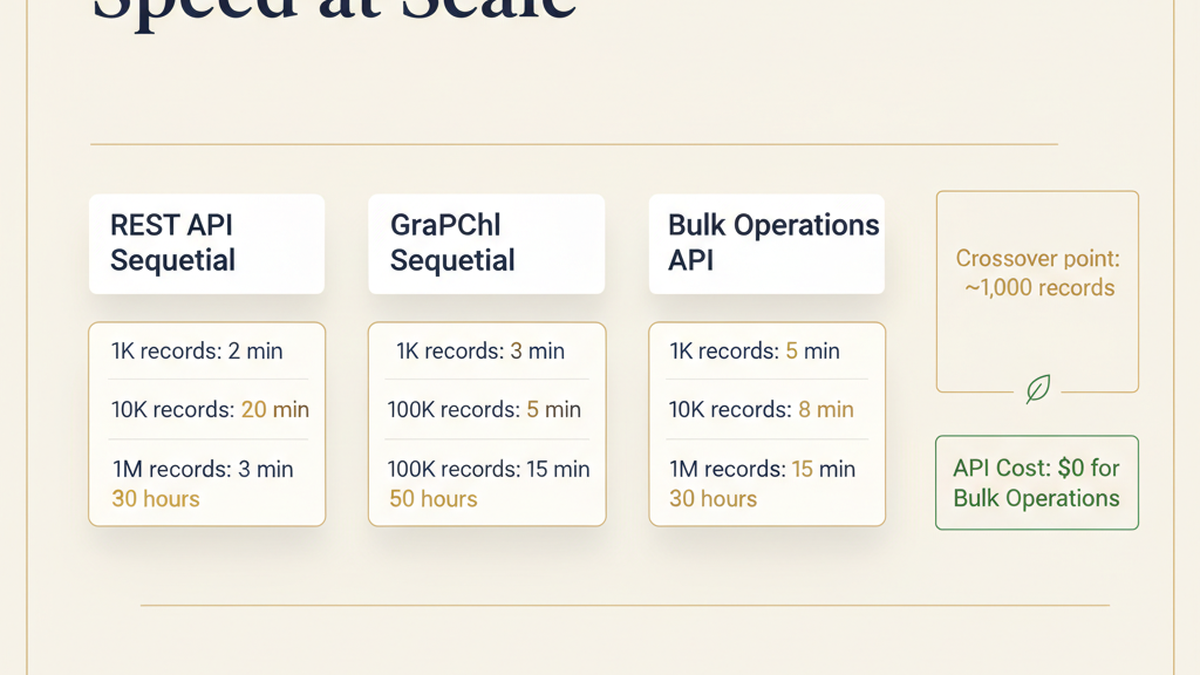
| Method | 1K Records | 10K Records | 100K Records | 1M Records |
|---|---|---|---|---|
| REST API (sequential) | 2 min | 20 min | 3 hours | 30 hours |
| GraphQL (sequential) | 3 min | 30 min | 5 hours | 50 hours |
| Bulk Operations | 5 min | 8 min | 15 min | 30 min |
| API cost | ~$0 | ~$0 | ~$0 | ~$0 |
The crossover point is clear: for anything above 5,000 records, Bulk Operations wins on both speed and rate limit safety. The 5-minute minimum for small datasets is the async job overhead — creation, queuing, processing, and result file generation.
Error Handling That Actually Works
Bulk Operations doesn't fail the entire job when individual records error. This is a feature, not a bug — but it means your error handling needs to be explicit.
How partial success works: If you submit 100K records and 50 fail, the operation status is still COMPLETED. You get 100K result lines — 99,950 successes and 50 with error details.
Common error types:
Validation errors (missing required fields), not-found errors (referencing IDs that don't exist), and permission errors (attempting to update protected fields). Each failed record includes the specific error:
{"data": {"productUpdate": {"product": null, "errors": [{"field": "title", "message": "Title can't be blank"}]}}}
Production retry pattern: Parse the result file, extract failed records with their error messages, fix the underlying data issues, then resubmit only the failures as a new bulk operation. Don't resubmit the entire dataset — Shopify won't deduplicate, and you'll create duplicate records.
Key Takeaways for Shopify Developers
Use Bulk Operations API for any data operation touching 1,000+ records. The workflow is consistent: generate JSONL, submit the bulk operation, poll for completion, parse results, handle errors.
The best use cases: inventory adjustments across multiple locations, product imports and platform migrations, catalog-wide price changes, and order metadata updates. Not suitable for real-time operations — use standard GraphQL for anything that needs sub-second latency.
For Shopify Plus merchants running at scale, Bulk Operations API isn't optional — it's core infrastructure. The 50MB file limit and 10-concurrent-operation cap are generous enough for most enterprise workloads. If you're hitting those limits, you're probably running the kind of operation that needs a dedicated data pipeline anyway.
Build Your Shopify Integration Infrastructure
Scaling API operations on Shopify requires architecture decisions that compound over time. Whether you're building a bulk migration pipeline, syncing inventory across warehouse systems, or designing a custom app that handles high-volume data, the technical foundation matters.
Talk to Tenten's Shopify development team about your integration architecture →
This guide covers Shopify API version 2025-01. Bulk Operations API has been stable since 2021 with no breaking changes to the core workflow. Check Shopify's API changelog for the latest supported mutations and rate limit adjustments.
Frequently Asked Questions
What's the difference between Bulk Operations API and standard GraphQL for updating Shopify data?
Standard GraphQL processes mutations one at a time and charges cost points against your rate limit (40,000 points/minute). Bulk Operations API is asynchronous — you upload a JSONL file, Shopify processes all records in parallel without rate limits, and you download results when complete. For datasets above 1,000 records, Bulk Operations is 10–100x faster and has zero API cost.
Can I use Bulk Operations API to update customer data?
No. Shopify excludes customer mutations from Bulk Operations API for privacy and security reasons. Use the REST Admin API for customer updates, with rate-limit-aware retry logic. This applies to customer creation, profile updates, and PII fields. Products, inventory, and orders are all supported.
What happens if some records fail during a bulk operation?
The operation still completes successfully. Shopify reports partial success: if you submit 100K records and 50 fail, the status is COMPLETED with 100K result lines — 99,950 successes and 50 with detailed error messages. Parse the failures, fix the underlying data, and resubmit only the failed records in a new operation.
How long does a bulk operation with 1 million records take?
Typically 30–60 minutes, depending on server load and operation type. Shopify processes bulk jobs in FIFO queue order. Submitting during off-peak hours (2–6 AM UTC) reduces queue wait time. The same 1M-record job can take 90 minutes at 2 PM versus 30 minutes at 3 AM.
Is there a cost for using Shopify's Bulk Operations API?
No. Bulk Operations API is free — Shopify doesn't charge API cost points for async processing. This is a significant advantage over sequential GraphQL mutations, where a 100K-variant update would consume 10M cost points. The only constraint is the 50MB file size limit and 10 concurrent operations per store.
What file format does Bulk Operations API accept?
JSONL (JSON Lines) — one JSON object per line, where each object represents a single mutation. Max file size is 50MB, supporting up to 25 million records per file. For datasets exceeding these limits, split into multiple operations that can run concurrently (up to 10 per store).
When should I use GraphQL instead of Bulk Operations API?
Use standard GraphQL for real-time operations (single product updates, checkout modifications, live inventory checks), anything under 1,000 records, and scenarios requiring immediate response. Bulk Operations has a minimum latency floor of about 5 minutes due to job creation and queuing overhead, making it unsuitable for user-facing, synchronous workflows.