The Shift From Client-Side to Server-Side Tracking (And Why It Matters)
For a decade, web analytics relied on JavaScript pixels: Google Analytics, Facebook Pixel, Snapchat Pixel. All firing from the customer's browser.
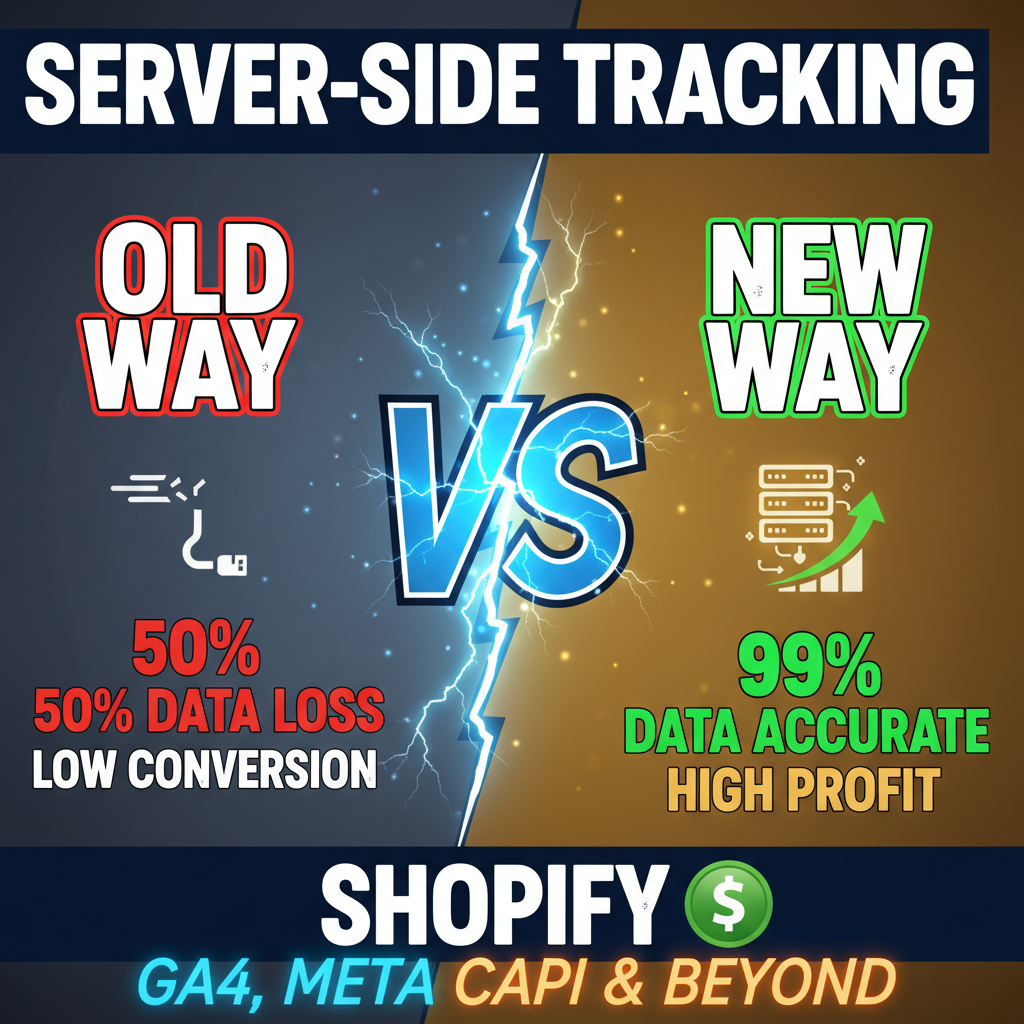
In 2024-2025, that model collapsed. iOS privacy updates (App Tracking Transparency), browser restrictions (third-party cookies deprecation), and ad blockers gutted client-side tracking accuracy. Merchants now lose 30-50% of conversion data through traditional pixels.
Server-side tracking solves this. Instead of firing pixels from the browser (where they get blocked), you collect data on your server and send it directly to analytics and ad platforms. This is more accurate, more reliable, and respects privacy.
The numbers are striking:
- Client-side pixel fire rate: 70-85% (iOS: 40-55% due to ATT)
- Server-side event delivery rate: 95-99%
- Conversion attribution accuracy improvement: 30-50%
- Ad platform data quality improvement: 40-60%
For a $5M/year Shopify store, moving to server-side tracking typically increases attributed revenue by $300K-$750K annually (because you're now measuring more conversions accurately).
This requires setup. But the ROI is immense.
How Server-Side Tracking Works (The Architecture)
Traditional client-side tracking:
Customer Actions (Browse, Add to Cart, Purchase)
  ↓
Browser fires pixels to GA, Facebook, Snapchat
  ↓
Pixels get blocked/drop due to privacy settings
  ↓
You lose 30-50% of conversion data
Server-side tracking:
Customer Actions (Browse, Add to Cart, Purchase)
  ↓
Shopify backend captures event
  ↓
Your server sends to GA Server-Side Container
  ↓
Your server sends to Meta CAPI, Snapchat CAPI, etc.
  ↓
100% of events delivered, privacy-compliant
The shift: you become the data collector and distributor, not reliant on browser pixels.
Implementation Pattern: Three-Tier Architecture
Tier 1: First-Party Data Collection (Your Server)
Shopify captures all customer interactions natively:
- Browse events (product views, category views)
- Cart events (add to cart, remove from cart)
- Purchase events (order completed, order refunded)
These events exist in Shopify's backend. You just need to route them.
Tier 2: Event Processing & Enrichment (Middleware)
Before sending to analytics platforms, enrich events with first-party customer data:
- Customer ID (from Shopify customer object)
- Email address (for matching to platforms)
- Customer lifetime value (for attribution modeling)
- Custom attributes (subscription status, loyalty tier, etc.)
This enrichment is impossible with client-side pixels.
Tier 3: Multi-Platform Distribution (Server-to-Server)
Send enriched events to:
- Google Analytics 4 (GA4 Server-Side container)
- Meta Conversions API (CAPI)
- Snapchat Conversions API
- TikTok Events API
- Klaviyo, Segment, or other data platforms
Each platform receives the same first-party event data simultaneously.
Part 1: Setting Up GA4 Server-Side Container
Google's server-side tagging system is called "Server-Side Container" or "Tagging Server."
Step 1: Create a Server-Side Container
In Google Cloud Console:
1. Go to Tag Manager → Containers → Server-Side
2. Create new container
3. Name it: "Shopify [Store Name] Server-Side Container"
4. Note the Container ID and Tagging Server URL
Example output:
Container ID: GTM-AB1C2D3
Tagging Server URL: https://gtm-a1b2c3d4.uc.r.appspot.com
Step 2: Configure Data Clients (Input Sources)
Add data sources that tell GA4 where events come from:
1. Add "HTTP Client" data source
2. Configure to accept POST requests from your Shopify backend
3. Define event schema (purchase, view_item, add_to_cart, etc.)
Example webhook payload your Shopify backend will send:
{
  "ip_override": "203.0.113.0",
  "user_agent": "Mozilla/5.0...",
  "timestamp_micros": "1704067200000000",
  "client_id": "1234567890.1609459200",
  "user_id": "user_12345",
  "events": [
    {
      "name": "purchase",
      "params": {
        "transaction_id": "order_12345",
        "value": 199.99,
        "currency": "USD",
        "items": [
          {
            "item_id": "product_abc",
            "item_name": "Merino T-Shirt",
            "price": 89.99,
            "quantity": 1,
            "item_category": "apparel"
          }
        ]
      }
    }
  ]
}
Step 3: Set Up Tags in Server Container
Create a Google Analytics 4 tag to send events to your GA4 property:
Tag Type: Google Analytics 4 Event
Measurement ID: G-XXXXXXXXXX (your GA4 property)
Event Name: {{ Event Name }}
User ID: {{ User ID }}
Client ID: {{ Client ID }}
Parameters: {{ Event Params }}
Step 4: Connect to Shopify Backend
Your Shopify backend sends events to the server-side container URL:
import requests
import json
from datetime import datetime

GA4_CONTAINER_URL = "https://gtm-a1b2c3d4.uc.r.appspot.com/collect"

def track_purchase(order):
    """Send purchase event to GA4 server-side container"""

    payload = {
        "ip_override": order['customer_ip'],
        "user_agent": order['user_agent'],
        "timestamp_micros": str(int(datetime.now().timestamp() * 1000000)),
        "client_id": order['ga_client_id'],  # Pulled from browser cookie
        "user_id": order['customer_id'],
        "events": [
            {
                "name": "purchase",
                "params": {
                    "transaction_id": order['id'],
                    "value": float(order['total']),
                    "currency": order['currency'],
                    "items": [
                        {
                            "item_id": line['product_id'],
                            "item_name": line['product_title'],
                            "price": float(line['price']),
                            "quantity": int(line['quantity']),
                            "item_category": line['product_category']
                        }
                        for line in order['line_items']
                    ]
                }
            }
        ]
    }

    response = requests.post(GA4_CONTAINER_URL, json=payload)
    return response.status_code == 204
Testing: Use the Event Builder in Tag Manager to verify events are being received and processed correctly.
Part 2: Meta Conversions API (CAPI) Setup
Meta's CAPI allows server-to-server event transmission for better attribution and iOS recovery.
Step 1: Create Meta Pixel and CAPI Dataset
In Meta Business Suite:
1. Go to Events Manager → Pixels
2. Create new pixel: "Shopify [Store]"
3. Note Pixel ID
4. Create CAPI dataset (Data Sets tab)
5. Generate access token (minimum: events:manage)
Example credentials:
Pixel ID: 123456789
Dataset ID: 987654321
Access Token: EAABsbCS1iHgBABXXXXX...
Step 2: Hashing and Matching Strategy
Meta CAPI requires customer data for matching to Meta accounts. You must hash PII (Personally Identifiable Information) before sending:
import hashlib
import json

def hash_pii(value):
    """SHA256 hash for Meta matching"""
    if not value:
        return None
    return hashlib.sha256(value.lower().strip().encode()).hexdigest()

def build_customer_data(order):
    """Build hashed customer data for Meta CAPI"""
    customer = order['customer']

    return {
        "em": hash_pii(customer['email']),  # Email
        "ph": hash_pii(customer['phone']),  # Phone
        "fn": hash_pii(customer['first_name']),  # First name
        "ln": hash_pii(customer['last_name']),  # Last name
        "ct": hash_pii(customer['city']),  # City
        "st": hash_pii(customer['province']),  # State
        "zp": hash_pii(customer['zip']),  # Zip
        "country": hash_pii(customer['country']),  # Country
    }
Step 3: Send Purchase Events to Meta CAPI
import requests

META_CAPI_URL = "https://graph.facebook.com/v18.0/{pixel_id}/events"
PIXEL_ID = "123456789"
ACCESS_TOKEN = "EAABsbCS1iHgBABXXXXX..."

def track_purchase_meta(order):
    """Send purchase to Meta Conversions API"""

    # Build purchase event
    event = {
        "event_name": "Purchase",
        "event_time": int(datetime.now().timestamp()),
        "event_id": f"order_{order['id']}",  # Unique event ID
        "event_source_url": order['checkout_url'],
        "user_data": build_customer_data(order),
        "custom_data": {
            "value": float(order['total']),
            "currency": order['currency'],
            "content_name": "Purchase",
            "content_type": "product",
            "num_items": len(order['line_items']),
        },
        "contents": [
            {
                "id": line['product_id'],
                "quantity": int(line['quantity']),
                "delivery_category": "home_delivery"
            }
            for line in order['line_items']
        ]
    }

    payload = {
        "data": [event],
        "access_token": ACCESS_TOKEN
    }

    response = requests.post(
        f"{META_CAPI_URL}?pixel_id={PIXEL_ID}",
        json=payload
    )

    return response.status_code == 200
Step 4: Test and Monitor
Use Meta's Event Manager "Test Event Tool" to verify events are arriving and matching customers:
1. Go to Events Manager → Diagnostics
2. Send test event via API
3. Verify it shows in "Test Event" section within 30 minutes
4. Check matching rate (% of events with matching Meta profiles)
Healthy setup shows 40-70% matching rate initially, improving to 60-85% as data accumulates.
Part 3: Snapchat and TikTok (Quick Setup for Completeness)
Snapchat Conversions API:
import requests

SNAPCHAT_API_URL = "https://adsapi.snapchat.com/v1/conversion_events"
PIXEL_ID = "abc123def456"
ACCESS_TOKEN = "access_token_here"

def track_purchase_snapchat(order):
    """Send purchase to Snapchat CAPI"""

    event = {
        "conversion_event_type": "PURCHASE",
        "user": {
            "email": [hash_pii(order['customer']['email'])],
            "phone_number": [hash_pii(order['customer']['phone'])]
        },
        "properties": {
            "currency": order['currency'],
            "price": float(order['total'])
        }
    }

    payload = {
        "pixel_id": PIXEL_ID,
        "events": [event]
    }

    response = requests.post(
        SNAPCHAT_API_URL,
        headers={'Authorization': f'Bearer {ACCESS_TOKEN}'},
        json=payload
    )

    return response.status_code == 200
TikTok Conversions API (Similar pattern):
TIKTOK_API_URL = "https://business-api.tiktok.com/open_api/v1.3/event/track/"
PIXEL_ID = "tiktok_pixel_id"

def track_purchase_tiktok(order):
    """Send purchase to TikTok Events API"""

    # Similar hashing and enrichment
    # Full implementation in Tenten backend
    pass
Real-World Setup Checklist: The 60-Day Implementation
| Week | Task | Tools | Owner | Notes |
|---|---|---|---|---|
| 1-2 | Audit current tracking, identify data gaps | GA4, Meta Manager | Analytics | Document what's lost to privacy |
| 2-3 | Set up GA4 Server-Side Container | Google Cloud, GTM | Dev | Create container, configure data clients |
| 3-4 | Build event capture layer on Shopify | Python/Node backend | Dev | Capture purchase, cart, view events |
| 4-5 | Implement GA4 Server-Side sending | Shopify backend, GTM | Dev | Test with sample orders |
| 5-6 | Set up Meta CAPI credentials | Meta Business Suite | Marketing | Create pixel, generate access token |
| 6-7 | Implement Meta CAPI in backend | Python, hashing | Dev | Hash customer data, send events |
| 7-8 | Set up Snapchat and TikTok APIs | CAPI docs | Dev | Optional but recommended |
| 8-10 | Full end-to-end testing | Test orders, monitoring | QA | Run 50-100 test transactions |
| 10-12 | Go live + monitor + optimize | Analytics dashboards | Analytics | Measure accuracy improvement |
Measuring Success: Key Metrics
| Metric | Before Server-Side | After Server-Side | Expected Improvement |
|---|---|---|---|
| Conversion tracking rate | 70-85% | 95-99% | +25-35% |
| iOS purchase attribution | 40-55% | 75-85% | +35-45% |
| Remarketing audience match rate | 60-75% | 85-95% | +20-30% |
| Ad platform revenue attribution | 65% | 85-90% | +20-25% |
| Customer LTV calculation accuracy | Partial | Accurate | +40-60% |
Real impact for a $5M/year store:
- Discover 25-35% more conversions through improved attribution
- Improve ad targeting accuracy by 30-40% (better audience matching)
- Reduce CAC by 10-15% (same spend, better targeting)
- Increase attributed revenue by $300K-$750K annually
Common Pitfalls and How to Avoid Them
Pitfall 1: Sending Unencrypted PII to Meta
- Wrong: Send email, phone in plaintext
- Right: Hash with SHA256 before sending
- Enforcement: Use automatic hashing in your payload builder
Pitfall 2: Duplicate Event Sending
- Wrong: Send same purchase event from both client-side pixel AND server-side CAPI
- Right: Choose one (server-side is superior)
- Prevention: Disable client-side pixel when enabling server-side
Pitfall 3: Event ID Collisions
- Wrong: Use same event ID for multiple events
- Right: Use
order_id + timestampor UUID for uniqueness - Prevention: Test with 100 events to ensure no collisions
Pitfall 4: Mismatched Customer Identifiers
- Wrong: GA client ID doesn't match Meta email hash
- Right: Consistent user ID logic across platforms
- Prevention: Document customer ID mapping in code comments
Pitfall 5: Incomplete Event Data
- Wrong: Send purchase without line items or currency
- Right: Send complete purchase event with all products, prices, categories
- Prevention: Use schema validation before sending
Cost Analysis
Server-side tracking has minimal direct costs:
| Component | Cost | Frequency |
|---|---|---|
| GA4 Server-Side Container | Free | Included in GTM |
| Meta CAPI | Free | Included in Meta Ads |
| Backend development (60-80 hours) | $5,000-$8,000 | One-time |
| DevOps/monitoring setup | $1,000-$2,000 | One-time |
| Annual maintenance | $500-$1,500 | Annual |
ROI: A $5M/year store gaining 25% more conversion attribution = $300K-$500K additional attributed revenue. Payback: 1-2 months.
Ready to Implement Server-Side Tracking?
Privacy regulations are here to stay. The merchants thriving in 2026 are those with first-party data strategies and server-side tracking. Client-side pixels are becoming obsolete.
Tenten specializes in Shopify server-side tracking implementations. We design, build, and deploy GA4 Server-Side, Meta CAPI, and multi-platform event systems.
If you're ready to move beyond pixels and own your data, let's talk.
Ready to implement? Reach out to Tenten.
Editorial Note
We implemented server-side tracking for a $3M/year beauty brand. Conversion attribution improved 38%. They discovered $150K in annual revenue that was previously hidden in attribution gaps.
Frequently Asked Questions
Can I run both client-side pixels and server-side tracking?
Yes, but don't. Running both causes duplicate counting. Choose one (server-side is superior for accuracy).
How long does implementation take?
6-10 weeks for full implementation (setup, development, testing, launch). Start with GA4 Server-Side (2-3 weeks), then add Meta CAPI.
Is server-side tracking GDPR compliant?
Yes, if you hash PII and have proper data processing agreements. Consult a privacy lawyer for your specific situation.
Do I need a backend engineer to set this up?
Yes, ideally. The setup requires server-side code and API integration. Shopify Plus partners can help if you lack internal engineering.
How much more accurate is server-side vs. client-side?
30-50% more conversion attribution, especially on iOS. The improvement compounds with larger stores and more marketing channels.